Notice: Function _load_textdomain_just_in_time was called incorrectly. Translation loading for the modern-events-calendar-lite domain was triggered too early. This is usually an indicator for some code in the plugin or theme running too early. Translations should be loaded at the init action or later. Please see Debugging in WordPress for more information. (This message was added in version 6.7.0.) in /home/sites/14b/d/d2c86a1dd7/public_html/wp-includes/functions.php on line 6131
Supermarkets Archives - Jordon Cox https://jordoncox.com/category/supermarkets/ Britain's Coupon Kid. Helping you make your money go further Sun, 14 Jan 2024 14:44:07 +0000 en-GB hourly 1 Too Good To Go – Save Money On Restaurant & Supermarket Food https://jordoncox.com/too-good-to-go-app/ https://jordoncox.com/too-good-to-go-app/#comments Thu, 30 Nov 2023 21:40:52 +0000 https://jordoncox.com/?p=3992 Nobody likes wasting food, and everybody loves saving money – so this…

The post Too Good To Go – Save Money On Restaurant & Supermarket Food appeared first on Jordon Cox.

]]>

Nobody likes wasting food, and everybody loves saving money – so this app is the best of both worlds. Too Good To Go can get you cheap supermarket and restaurant food at the end of each day.

If you’ve ever shopped for yellow sticker discounts in the supermarket, you’ll know it can be fun – but also a bit of a nightmare.

It’s a great way to save money, but sometimes there’s nothing you like and maybe even a tussle over the good stuff.

There is a way to solve this however with an app on your phone called Too Good To Go.

As the name suggests, it sells you boxes of expiring food that’s too good to be thrown away. 

With this app, you can get cheap food from supermarkets and also restaurants too.

Here’s how it works and how to get some discounted food:

Too Good To Go App – How It Works

You can download the Too Good To Go app for free on both iOS and Android devices.

Once downloaded, you’ll need to fill in a few details to set up an account and you’ll be ready to start saving.

This app works by providing a set number of ‘mystery boxes’ or meals at the end of the day for a cut down price, to avoid throwing it away.

The food you get will be either expiring that day, or something the supermarket/restaurant just has too much of.

If you’re lucky – you could pick up whole pizzas, or fine dining meals which they haven’t sold by days end.

Related: Olio App – Share Unwanted Food For Free

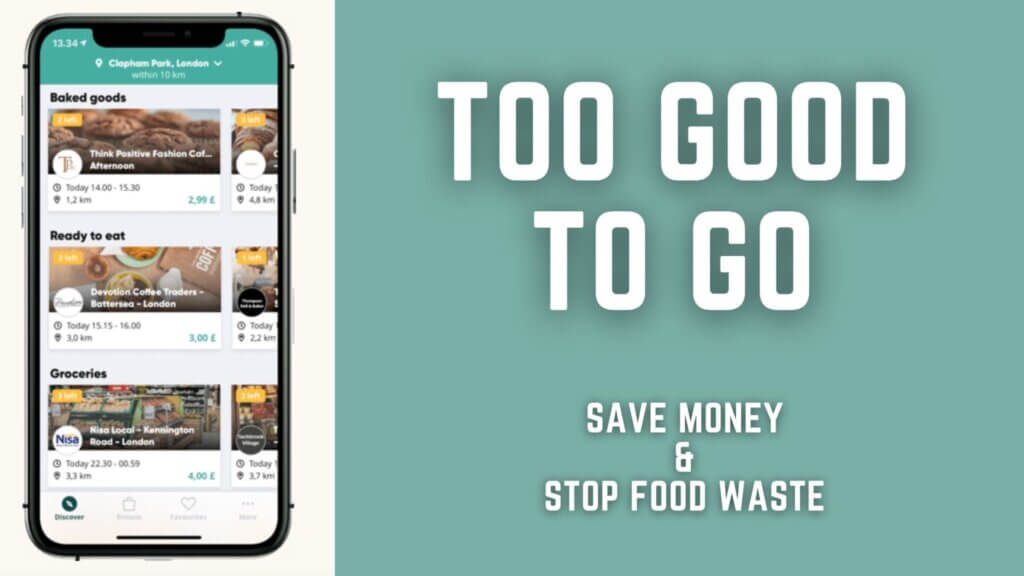
Too Good To Go – Inside The App

On landing on the home screen, different supermarkets and restaurants will pop up in your local area.

All have different prices and likely offer a mystery box of their expired food at the end of the day.

Too Good To Go Reduced Food App

Each deal also gives you a time to collect each mystery box – usually this is late afternoon or evening. 

How To Book Your Mystery Boxes

If you see something you like or want to pick up, you’ll need to place an order to reserve it.

Click on the offer you want to pick up, and you’ll be asked to pay in advance for the mystery box or restaurant food.

The usual cost is between £2-4 for a box or restaurant meal, and you can pay with card or Apple Pay.

Of course, as these deal are usually a mystery until you pick it up – this probably isn’t best for picky eaters, incase you get something you’re not fond of.

The deals on this app usually go quick – with the most options happening first thing in the morning.

Some deals sell out by 8-9am in the morning, with others hanging around for a bit longer.

RelatedBirthday Freebies 2021 – 10+ Free Treats To Claim

Too Good To Go Restaurant Takeaway Pizza

How To Claim Your Reduced Food

When your order has been confirmed, you’ll be given a time to show up at the restaurant or supermarket to pick it up.

This is usually within an hour window, where you need to claim it, otherwise you may lose your food and money.

When you show up to the location, show one of the workers your app order, and they’ll fetch your food for you.

You’ll need to swipe across on the screen when prompted to confirm you’ve claimed the reduced food, then you can be on your merry way!

If you picked up some supermarket mystery boxes, be sure to have a look through and put things in the freezer that you won’t eat that night.

If you manage to pick up a whole pizza, curry or takeaway… tuck in and enjoy straight away.

Related: Free Food From Apps UK

Which Supermarkets & Restaurants Can I Find?

Depending on where you live, you can find food from a number of big name restaurants and supermarkets, as well as independents.

For supermarkets, you can pick up boxes from selected Morrisons, M&S Food, Sainsbury’s and Budgens.

In terms of restaurants, you can find Costa, Greggs, Cafe Nero and many independents.

This isn’t an inclusive list – but it shows you where you can pick up some discounted food.

Of course if you live in a city, you’ll have a lot more option to choose from than if you live in a rural area – but hopefully there’s something for everyone.

My Experience – £11 Of Food For £3

I tried out Too Good To Go at my local Costa Coffee. They advertised a magic bag of items for £3.

Collection was between 4-5pm, which was quite reasonable – perfect stop off for a commute home.

After saying to the cashier I had a Too Good To Go order, he went to the sandwich aisle and picked up three that had expiry dates of that evening.

In total, these would’ve cost £11 if bought in store normally, but I got them for £3.

Taking them home and heating them up meant I got a cut price dinner for my household – and cheddar and tomato was my favourite!

Too Good To Go Costa Coffee Pick Up Deal
Here's my Costa Coffee Haul! £11 worth of items for £3.

How Much Do You Usually Save?

This app will only save you money if you actually eat the food it gives you.

I know this sounds silly to say, however some of the boxes and mystery bags you get from the supermarket has A LOT of food in. Quite often it’s a bit too much for my mother and I.

As a lot of it expires that night as well, unless if you have a large family (or can share with neighbours), it might be too much for you.

The boxes give you around £10+ worth of food for £2-4, so it’s a great saving if it’s eaten.

When it comes to restaurants however, this is great for pretty much anyone.

It’ll require planning by reserving a meal for the evening on the app early in the day, but getting a full restaurant meal worth £10+ for £2-4 is a bargain for anyone – especially if it’s your favourite takeaway.

RelatedCoupons UK – How to find them

Conclusion – Too Good To Go

If you love cutting down food waste and love yellow stickers and reduced food – you should be in heaven with Too Good To Go.

I recommend logging onto the app each morning to see what’s up for grabs – especially when you start to run out of food in your fridge.

Hopefully this saves you money – and are nomming on some cheap food very soon!

Have you ever used Too Good To Go? I’d love to know in the comments below, on Twitter @Jordon_Cox or on Facebook.

The post Too Good To Go – Save Money On Restaurant & Supermarket Food appeared first on Jordon Cox.

]]>
https://jordoncox.com/too-good-to-go-app/feed/ 23
Coupons UK – How to find them https://jordoncox.com/how-to-find-coupons-in-the-uk/ https://jordoncox.com/how-to-find-coupons-in-the-uk/#comments Sun, 19 Nov 2023 09:41:35 +0000 https://jordoncox.com/?p=1968 They can save you £100s of pounds and get you food for…

The post Coupons UK – How to find them appeared first on Jordon Cox.

]]>

They can save you £100s of pounds and get you food for free. UK Coupons are fantastic if used right – my biggest ever coupon shop was £600 of groceries for 4p! Here’s how to get them.

Updated May 2022

If you’re as hooked on the TV show Extreme Couponing as me, this is the blog for you.

I’ve been using supermarket coupons for 8 years now, and have saved well over £5,000 on my shopping by using them.

Back in the height of the couponing days, you’d have them coming from everywhere… online, newspapers, magazines, apps and more.

It’s not as easy to do it now, but you can still save a lot of money. Here are my tips on how to get them and use them:

My biggest UK Couponing shopping trip – £600 of shopping for 4p

My biggest grocery shop was over £600 worth of items which I got for 4p with coupons. How’s that for Extreme Couponing in the UK?

It took me around 2 months to round up all of the coupons needed to get this done – but it was so worth it.

This particular shop was for charity, and I ended up feeding 40 families over the Christmas period with my couponing bargains.

Here is young me while I was on my shop (which took me around 5 hours in total)

How to coupon in the UK Coupons Jordon Cox Britain's Coupon Kid

Can you Coupon in the UK?

Yes you can! You may not be able to achieve the kind of savings that the Americans do, but there are still coupons around for you to save money with.

The peak of couponing in the UK happened around 2012-2015, so you see less and less of them nowadays. But it doesn’t mean there aren’t any.

It’s hard to say why a lot of them aren’t around any more, but there are still ways to save money with coupons in the UK.

I’ve rounded up all the places that you can get them below, and hopefully it’ll save you a little bit of money on your supermarket shop.

If shopping with physical coupons isn’t your thing, perhaps check out how to get free food via apps – there’s £50+ worth to get!

Where Can I Get Coupons For Free?

Everywhere! Be warned… you should never be paying money for coupons on the likes of eBay and Facebook marketplace.

Free coupons can be found in lots of places. From printing them out online, to using mobile apps, and browsing magazines.

Getting your hands on coupons shouldn’t cost you anything, other than your time.

If you’d prefer to listen to the best places to find coupons, you can with my brand new podcast. Here are my tips to supermarket coupons on the Secrets To Saving Money Podcast:

To continue reading in this blog instead – here are the best places to get them:

Compliment brands for coupons

It sounds a bit strange, but bare with me on this. If you really like a brand or a company – have you ever tried writing to them to tell them so?

If you send them a really nice email saying how much you love their brand – or even ask for free samples or coupons – you may actually get some back.

I’ve done this multiple times in the past, and got £100s worth of coupons and samples. The more effort you put into writing to the company – the better.

I suggest getting creative like sending a love letter or a poem. I once sent a 4 line poem to Innocent drinks over email, and it went something like this:

Innocent, Innocent, you are a dream,
No other drink could be so supreme,
Oozing with joy, bursting with flavour,
Innocent drinks, you are my saviour.

This one poem got me £20 worth of coupons back in the post, for just 5 minutes of work! Told you it sounds crazy, but it could pay off in spades.

If you’re not a wordsmith like me, you could send birthday cards if it’s a company’s birthday, get your kids/grandkids to draw a picture, or get creative and write a song.

Brands love fan interaction like this, and it’s something they could either use for promotion or on social media. But also in return, you’ll get something back.

Related: Mrs MummyPenny: How I Saved £7,500 In 6 Months

Cashback apps

Coupons in the UK are now going digital. The best place to find some of the biggest discounts now, is right in the palm of your hand.

These supermarket coupons are in the form of cashback, so instead of redeeming them at the till, you get money back after you’ve purchased.

Here are the main cashback apps that are worth knowing about:

Shopmium

If you’ve read my full Shopmium review, you’ll know that this is the best app for getting freebies. 

At the time of writing you can get a free Ben & Jerry’s ice cream tub, free water and free yoghurt – but you’ll have to buy it first and claim back later).

At the moment, there is £79 worth of cashback to claim from Shopmium, and the best part is, you can stack cashback with coupons. 

If you have an item with a physical coupon for, use it when paying, and you can still get cashback (which will mean double the saving). This gets into the ‘extreme couponing UK’ territory – and it means it saves you more money.

Shopmium deals

Jam Doughnut

JamDoughnut is a brand new cashback app where you can get £100s worth of cashback instantly – this includes supermarkets.
 
It works through buying gift cards for your favourite brands, and then being rewarded with some cashback on your purchase.
 
You can then go ahead and spend the gift card with some free cashback in your account.
 
On JamDoughnut, you can get cashback on Asda, Sainsbury’s M&S, Waitrose and Iceland – potentially saving a lot of money over the year.
 
You can get £1 free credit and £4 extra credit when you make your first purchase by using the code R2GX when signing up.
 
 
JamDoughnut App Cashback Supermarkets

Airtime Rewards

If you’re not signed up to Airtime Rewards, you’re missing out on free cash. Once you link your cards to the app, every time you spend at a retailer with cashback on, it’ll give you money, and you don’t have to do a thing.

If you’re spending in the supermarket, you can get up to 5% back when you do your shopping at Waitrose (in store or online), or 10% back when shopping at Morrisons (in store or online).

You can of course stack this again, so if you get £100 of shopping in Morrisons and use £20 worth of coupons, then you’ll get £8 in cashback from Airtime Rewards.

Airtime Rewards app

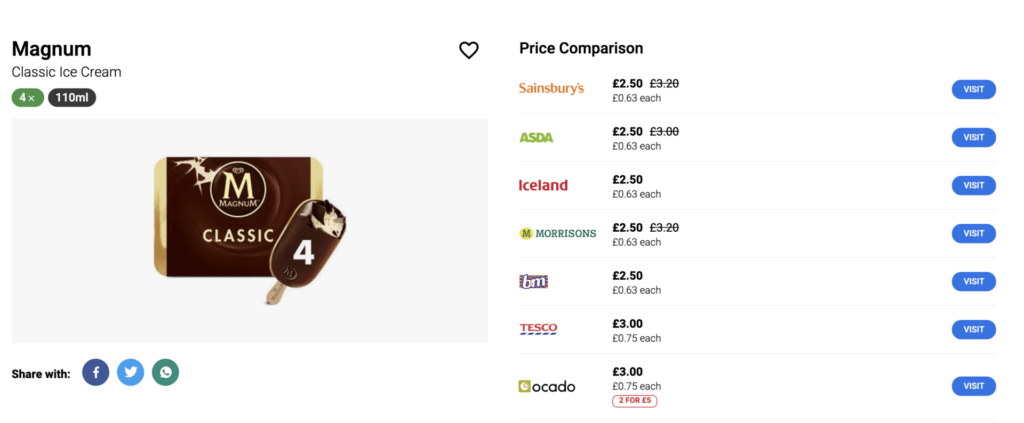
Related: Compare prices in supermarkets

Coupons UK – Tesco Magazine

Each month, there are coupons to be found in the free Tesco magazine. I write a blog around what coupons are in the magazine each month.

They appear on the inside front cover, so if you see one that you like, you can rip it out and use it straight away if you wanted. As the magazine is free – you can pick up as many as you want too.

There have been some great coupons in the Tesco magazine previously, including a free multipack of crisps and free Coke Zero… so it’s worth keeping an eye out.

Tesco Magazine January 2020
Here's an example of what the Tesco coupons look like

Printable Coupons UK

Once upon a time there were 4 or 5 different websites you could go on and find printable coupons to use. One by one, they have been fading away, and now, there are not many places to get them.

There are still certain websites that have online coupon lists still there, but with the message “sorry, we don’t have any coupons right now”. So the technology is still there – and they may return.

I’ve listed the websites below that still have the software available, but don’t have any coupons on there right now. Hopefully they will come back.

It’s worth noting for these, you’ll need to install a piece of software to your computer called ‘CouponPrinter.exe’.

Don’t worry – it’s safe to download, and is used to accurately print out barcodes and for tracking number of prints on each device.

Caring Everyday

This was a website run by Johnson & Johnson, so Caring Everyday is where you could get coupons from them.

There were usually coupons on there for kids products and illness remedies like Calpol and Imodium.

SuperSavvyMe

This is a P&G owned website, so competitions, offers and coupons for cleaning products and brands were found here.

Currently no coupons, but there are competitions currently on SuperSavvyMe in the coupons place.

MoneySavingExpert 

My former place of work has a coupons page, which is kept up to date with coupons from brand websites. Not all of them are printable coupons, so you’ll have to wade through the other deals to find them.

Coupons in the UK - Printable Coupons
This is what most printable coupons look like

Lidl Plus Coupons UK

A brand new addition to the couponing world is the new Lidl Plus app. Once downloaded from the Apple Store or Google Play store, you can access discounts at Lidl.

Once downloaded, you get £5 off your shop, and UK coupons for new products in store come out each Thursday.

What’s more, each time you shop, you get a virtual scratchcard, which could unlock even more offers for you on your next shop.

Here’s the full blog if you wanted to find out more.

Lidl Plus Coupon £5 off

TopCashback UK

Though not technically a coupon for the supermarket – if you haven’t heard of TopCashback, it’s worth knowing about.

If you ever buy anything online (supermarket shopping, insurance, hotels, clothes, takeaways and more) – you can get money back for spending.

By clicking through TopCashback’s website before you purchase, you can get a percentage of your total spend back as cashback. This can add up to £100s.

I’ve been using it for around 5 years, and I’ve built up a total of over £750 cashback, just by spending normally – and clicking through TopCashback.

For full info, see my TopCashback Guide.

TopCashback total earned


So there we have it!

Those are some of the best ways to find coupons in the UK. 

Be sure to also check out my new blog about getting free food via apps – which are equally as good as coupons!

I hope this blog was useful and you start saving a bit of cash on your supermarket shopping. Please let me know if you make a saving or score some coupons UK.

What has been your biggest discount by using coupons in the UK? I’d love to know in the comments below, on Twitter @Jordon_Cox or on Facebook.

The post Coupons UK – How to find them appeared first on Jordon Cox.

]]>
https://jordoncox.com/how-to-find-coupons-in-the-uk/feed/ 26
Supermarket Price Comparison – MySupermarket alternatives https://jordoncox.com/supermarket-price-comparison/ https://jordoncox.com/supermarket-price-comparison/#comments Fri, 20 Aug 2021 19:41:11 +0000 https://jordoncox.com/?p=1684 We all know about price comparison websites, helping you save money on…

The post Supermarket Price Comparison – MySupermarket alternatives appeared first on Jordon Cox.

]]>
We all know about price comparison websites, helping you save money on car insurance for example. But did you know there’s also supermarket price comparison sites too? So how do you compare supermarket prices? What are the MySupermarket alternatives? Find out in this blog.

This blog has been updated in August 2021

MySupermarket used to be the go to website for comparing your supermarket shopping basket. You can find out what products were cheapest, and where to go to save money.
 
As of 1st March 2020, MySupermarket closed for good, and in the time since, there have been a number of MySupermarket alternatives pop up to help you save a little bit of money.
 
These new websites can be useful to compare prices, but some don’t work very well at all. There is one supermarket comparison website that is my favourite though.
 
Here is all the information you need, and how to use it:

Is there a My Supermarket alternative?

Yes! Even though MySupermarket has gone – there is alternative to My Supermarket for grocery price comparison.

On this new website, plenty of features have returned, including checking prices, seeing what deals are on, average pricing and alerts for price drops.

If used before doing your supermarket shopping, it could really add up to a lot of money saved

Compare Supermarket Prices – Trolley.co.uk

The new supermarket comparison website is called Trolley. It works in a very similar way to MySupermarket, where searching for your item in the search bar shows you the pricing.

It claims to compare prices with other supermarkets on over 130,000 items, so you can find practically everything you can think of to compare prices on.

Trolley has one of the biggest number of supermarkets for comparison too, with Aldi, Asda, B&M, Boots, Co-op, Home Bargains, Iceland, Morrisons, Sainsbury’s, Waitrose and Wilko all getting involved.

Trolley Supermarket price comparison compare prices
 

There’s also a Trolley app available for download on both the App Store and Google Play, that lets you can in barcodes to see where it’s cheapest to buy. 

It’s a good alternative to MySupermarket, though using it as a supermarket price comparison for each item once at a time can take time. There’s no feature yet to add things to a basket to compare the whole basket value, but it’s still early days – and more features will come soon.


This blog originally talked about MySupermarket, so I’ve kept the old blog below as it used to be to remember how it once was (in case any new companies want to match the old features their own version!)

If any other MySupermarket Alternatives pop up, I’ll be sure to write about them, and include them here.

Remember: If you’re new here, remember to sign up to my newsletter


MySupermarket – How It Worked

Knowing where the best place to get your groceries every week is hard to figure out. They all switch up offers near enough weekly, so finding the cheapest price is difficult.

Luckily – there’s a way to check prices in each supermarket, and also see where would be cheapest for your whole supermarket shopping.

It’s a website called MySupermarket, and it’s got a ton of features to help you price compare the supermarkets. Here’s a full guide of what it is and how to use it.

Supermarket price comparison UK – MySupermarket

MySupermarket compares the prices in all major supermarkets including Tesco, Sainsbury’s, Asda, Morrisons, Waitrose, Iceland (and sometimes Aldi & Lidl).


It’s quite simple to use. Type in the name of the product into the search bar and find the item you are looking for. 

Once you’ve clicked on it, you’ll see a table of all the different prices in all supermarkets – so you can see where it’s cheapest. Pretty simple right?

Supermarket Price Comparison


It also has a handy feature that allows you to add your whole shopping into a basket, and find out which supermarket is cheapest to buy it all from – as it adds up the totals of the items you add.

So if you’re not loyal to one supermarket, you could potentially switch and save a bit of money every week on your shopping.

Related: Find out what loyalty cards you can add to Apple wallet

Compare supermarket prices at any time

As you begin to put items in your basket, you will notice the panel on the right of all the supermarkets. They are listed in order of basket total, cheapest at the top.

At any point during your shop, you can switch to another supermarket and MySupermarket will move all your items over to ones from that store. 

Bear in mind that some things won’t be available at another supermarket, for example an own-brand product, so will be substituted with something similar, so make sure you double check your basket before you check out.

After clicking on another supermarket in the list, you will be shown a ‘Switch and Save’ popup, showing you how much money you can save but even helps you out with whether that store has a rewards card and even compares delivery costs (or tells you if they don’t deliver).


Supermarket Price Comparison

How to purchase your basket – MySupermarket

Once you’ve added everything into your basket on MySupermarket to check where’s cheapest, you are able to move that exact basket over to any supermarket straight away for a quick and easy checkout. You won’t have to enter everything again.

Hit the ‘checkout’ button to begin your checkout. Once your MySupermarket account is linked to the supermarket’s account, you will be able to send your basket to the supermarket. 

After pressing this, you will be reminded of how much money you have saved while you wait for it to be transferred.

Once complete, simply head over to the supermarket’s own website and log in to see all your groceries in the basket, ready to book a time slot (if you didn’t earlier) and complete check out as normal. 


This way however, you know that after the supermarket price comparison, you’re getting the best price.

How do I check what’s cheap this week?

If you don’t have a shopping basket or items in mind, there is an offers tab to find reduced items in each supermarket. 

These items on offer will show you the percentage price drop from the regular price, the new price and the new price per unit value.

There are also ‘Savvy Buys’ which let you know when something is at least 30% cheaper than the average price across all the supermarkets – which is really handy to know.

How else can supermarket comparison websites save me money?

There are a lot of handy features other than supermarket price comparison that save you a little more if you’re a cost conscious shopper. Here are a few of my favourites:

  • Unlike all the normal supermarket online shops, MySupermarket allows you to sort products by price per unit, so when you’re looking to top up your dishwasher tablet stash, you can sort by how much each tablet costs – including ones which are on offer.
  • When you add a product to your basket, MySupermarket will check if that’s the cheapest option for that product and if it isn’t, it will put up a blue banner to suggest that you ‘Swap and Save’. Click this blue banner to be shown an array of alternative products.
  • This swap and save feature will also include items which would mean you would have to buy more (sometimes in conjunction with a multi-buy offer) to receive a cheaper per unit price for that product. Choosing to swap an item rewards you with a satisfying “ker-ching!” sound as it is added to your basket!
  • If you miss any of these blue banners, you can always check in using the saving options area in the right sidebar, where it shows you how many items you can swap to save money.

Compare Supermarket Prices

Is there a supermarket price comparison app for MySupermarket?

Of course! It’s available on both the App Store and Google Play. This is quite handy for using when you’re in the supermarket, as it has a scan feature. 


This lets you check the prices of that item in all supermarkets after scanning the barcode, and you can also set price alerts on it and get a notification when it drops in price.

Clicking the plus icon in a circle will add it to your basket. This scan feature is handy for adding things as you run out of them while cooking for example; scanning the product’s packaging as you put it in the bin. No need for shopping lists any more!

The app has similar functionality to the website – to swap supermarket you will need to look to the bottom of the screen and press the supermarket name and choose the alternative supermarket there.

Your swap and save deals are found by going to your basket (the icon looks like a shopping list in the top right), then pressing the saving centre blue banner at the bottom.

Conclusion – MySupermarket comparison

If you’re someone who does their weekly shop online, this is such an easy tool to use as you will already be used to the online supermarket websites.

The ability to sort by unit price is, on its own, a fantastic feature of anyone who wants to make sure they’re getting the best price for their grocery shopping.

Adding the app means busy people can add things to their basket during the week as they use items around the house, then only need to check prices and checkout when they want their next delivery.

Hopefully this gives you a glimpse into the world of supermarket price comparison in the UK. If you shop in Waitrose, don’t forget you can get 5% back with Airtime Rewards. You can also get free supermarket shopping by using cashback app Shopmium.

Have you ever used MySupermarket? I’d love to know in the comments below, on Twitter @Jordon_Cox or on Facebook.

The post Supermarket Price Comparison – MySupermarket alternatives appeared first on Jordon Cox.

]]>
https://jordoncox.com/supermarket-price-comparison/feed/ 219
Ecoegg – Washing And Drying Your Clothes On A Budget – AD https://jordoncox.com/ecoegg-washing-and-drying-your-clothes-on-a-budget-ad/ https://jordoncox.com/ecoegg-washing-and-drying-your-clothes-on-a-budget-ad/#respond Wed, 30 Jun 2021 17:58:02 +0000 https://jordoncox.com/?p=4655 Note: This is a paid collaboration with SaveMoneyCutCarbon. I have received a…

The post Ecoegg – Washing And Drying Your Clothes On A Budget – AD appeared first on Jordon Cox.

]]>

Note: This is a paid collaboration with SaveMoneyCutCarbon. I have received a box of items to review and paid to blog my experience

When I was younger, I thought that clothes were magically washed and put away for next time – how wrong I was. Washing clothes is now a daily part of life.

You don’t really think about it, but the amount of times things are washed in both the washing machine and tumble dryer – means a lot of water and electricity.

There are ways that you can wash and dry your clothes however with Ecoegg – as SaveMoneyCutCarbon have shown me this month:

Ecoegg Washing Machine

When washing your clothes in a washing machine – the brand of detergent you put in varies per household.

Some people choose it because of allergies, others because it’s good value – but there is another option if you wanted an eco way to wash clothes.

The Ecoegg laundry egg is a device to put in your washing machine in replacement of typical gels, powders and pods.

The egg shaped device is filled with little pellets that clean your clothes during a cycle. It contains no harsh chemicals and is good for your skin – and is supposed to stop you buying plastics that contain your detergents.

It costs about £8.55 for an egg that last 70 washes with the pellets. After those washes, you can refill the egg by buying more pellets.

Matched up against normal detergent, the eco eggs cost around 14p for each wash – whereas the biggest pack of Persil liquid laundry detergent (57 washes) costs around 12p per wash, so there isn’t much in it. But the refills are where the savings come in at £4.50 for 50 washes (10p per wash).

I tried using these, and didn’t have any problems. All the clothes were washed and cleaned, and come out smelling fresh.

Egoegg Tumble Dryer

As convenient as tumble dryers are, they are one of the most expensive domestic appliances in our house to run. Clothes tumbling around for hours at a time in a machine that has to create raw heat, obviously will consume a lot of electricity.

The Ecoegg dryer egg is supposed to combat this. It’s a plastic ball in the shape of an egg, with vents inside it, which separates the clothes, aiding their drying time by as much as 28%.

You can get a pack of 2 for around £9.99, and they should last, so over time they should save you money.

Saving 28% of time on drying your clothes in a tumble dryer is better for the environment, as you aren’t using as much electricity and the balls are supposed to decrease the amount of creases created in the clothes.

When I tested it out, I was able to shave around 10 minutes of drying time off – which wasn’t too bad, and the clothes were smelling fresh when done (though sometimes a little overpowering in smell).

My one criticism of them, is the fact that in my tumble dryer, they were incredibly loud. If you have an open plan space, the eggs bouncing around in them can be a racket. We even had the door shut, and could still hear it.

If you can live with that, or the tumble dryer is out of earshot – then it could be a great option.

Conclusion

Washing and drying clothes may not be the most glamorous thing in the world, but you can certainly make some small changes to help the environment and your wallet.

Ecoegg is something worth looking into and trying out. If you’ve used it before and have any thoughts, I’d love to know!

Have you tried Ecoegg, please do let me know in the comments below, on Twitter @Jordon_Cox or on Facebook.

The post Ecoegg – Washing And Drying Your Clothes On A Budget – AD appeared first on Jordon Cox.

]]>
https://jordoncox.com/ecoegg-washing-and-drying-your-clothes-on-a-budget-ad/feed/ 0
Stasher Bags – Reusable Storage Bags Review – AD https://jordoncox.com/stasher-bags-reusable-storage-bags-review/ https://jordoncox.com/stasher-bags-reusable-storage-bags-review/#respond Wed, 28 Apr 2021 16:10:36 +0000 https://jordoncox.com/?p=4371 One thing my partner and I cannot stand is food waste. So…

The post Stasher Bags – Reusable Storage Bags Review – AD appeared first on Jordon Cox.

]]>

One thing my partner and I cannot stand is food waste. So for this month’s SaveMoneyCutCarbon review, I was sent some Stasher bags to try. Here’s how I got on.

Putting left over food in the fridge or freezer can be a challenge, especially when packaging is huge.

Tupperware usually does the trick in my house, but I’ve just recently become aware of a product called Stasher bags.

These bags come in different sizes and can be put in the fridge, freezer, microwave, oven, dishwasher and a boiling pot of water.

So thanks to SaveMoneyCutCarbon, here’s a review of how they work and whether they’re worth it:

What Are Stasher Bags?

These bags come in a range of different sizes, including a pocket bag, sandwich bag, snack bag, half gallon bag and stand up bag.

So depending on what you’d be looking to put in it, there are options to choose from.

The bags themselves are made from silicon, that is completely safe and non toxic.

Because of what it’s made from, it’s endlessly reusable and won’t degrade over time.

All bags have a Pinch-Loc seal to seal it up, meaning you can keep everything inside and fresh too.

What Use Do They Have?

It’s fair to say that these bags can go through a lot. From the freezer and minus temperatures, to the oven of up to 200 degrees.

I’ve used them for everything this week to test them out, so here’s how they got on:

Fridge and Freezer

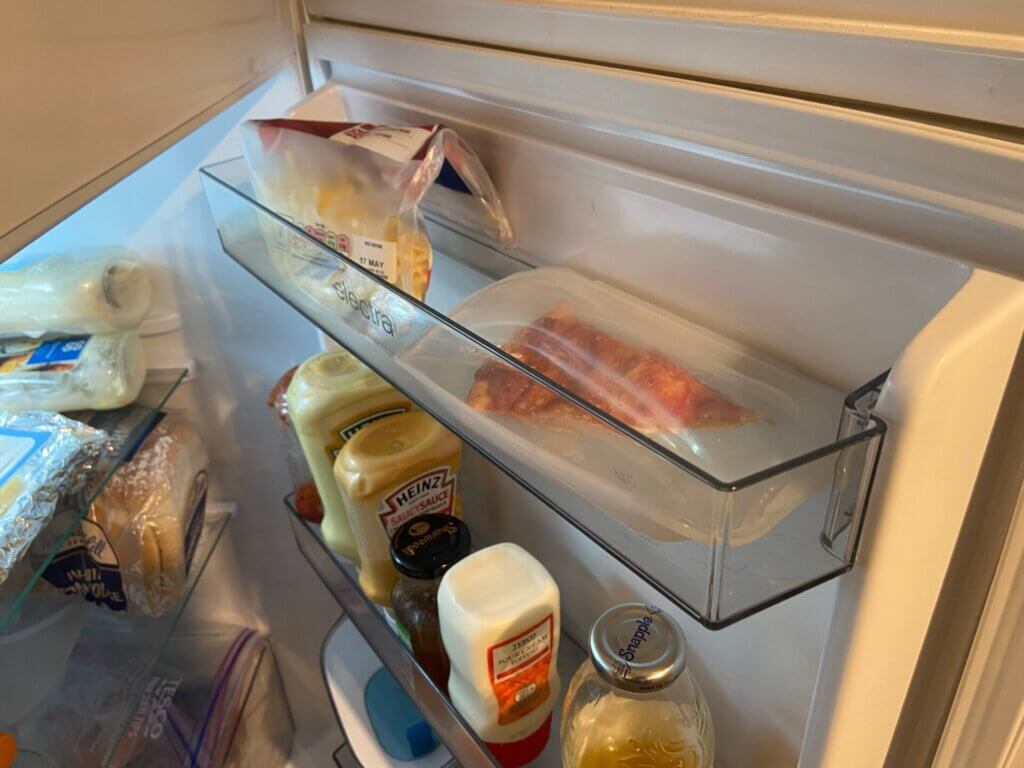
The Stasher bags can be stored in both fridge and freezer. I kept some leftover fish fingers in the freeze with the bag, and it worked a treat. Meant I could throw out the extra packaging and make some extra space:

Microwave

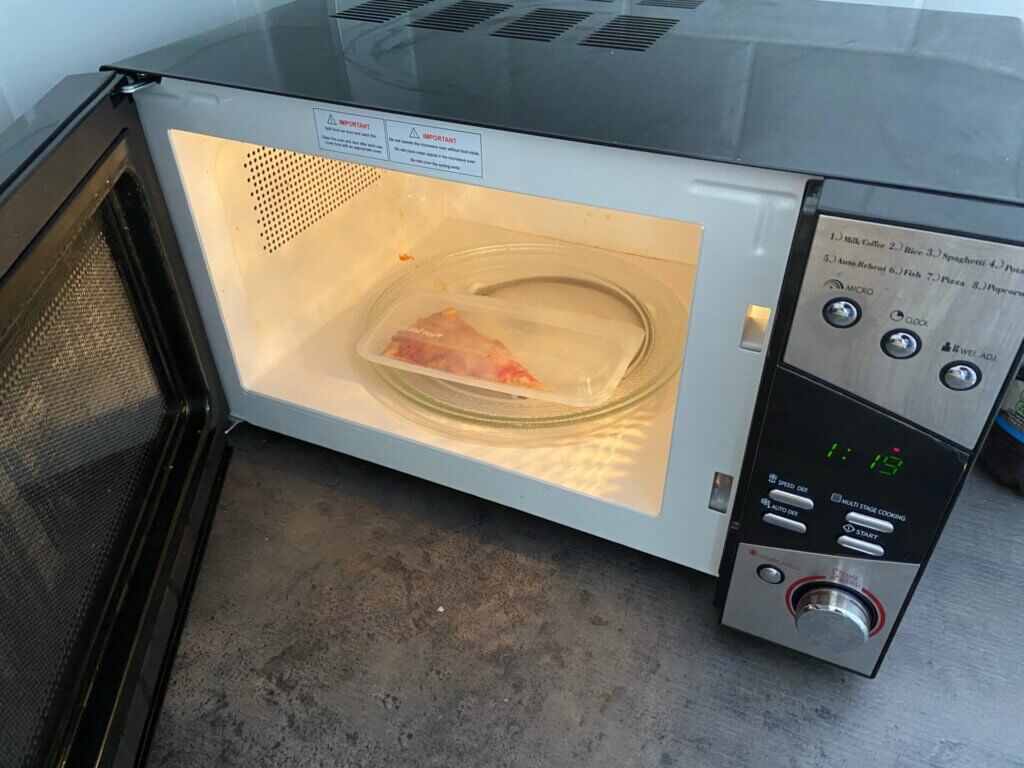
You can put food straight in the microwave without having to remove the Stasher bag – it’s microwave friendly.

It worked great on this slice of pizza.

Oven

The Stasher bags can also handle up to 200 degrees centigrade in heat – meaning you can put them directly into the oven with the food still inside.

You just open the zip for ventilation and in it goes.

Boiling Water

If you’re storing vegetables in a Stasher bag that need cooking, you can pop it straight in a pot of boiling water.

The vegetables will cook without getting wet, as it’ll be sealed inside the Stasher bag.

Dishwasher

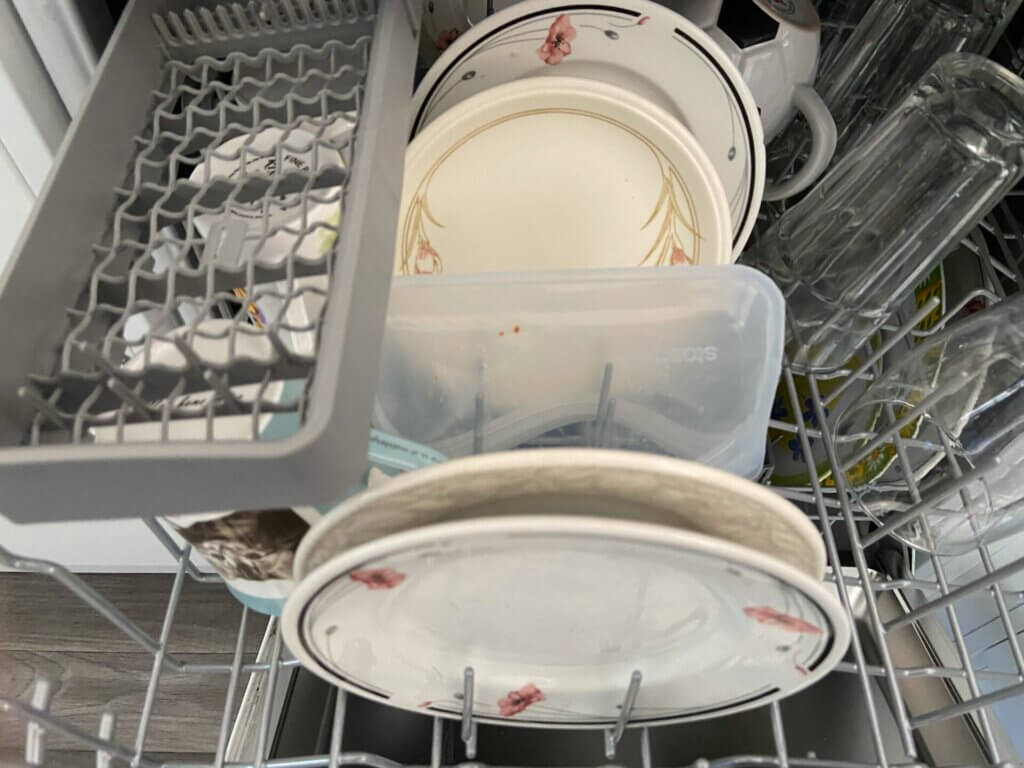
Finally, they can go straight in the dishwasher once you’re done using it.

Just have it open facing downwards and it’ll be good as new by the morning.

How Are They Different From Tupperware?

Tupperware would be the closest comparable items to Stasher as they do similar jobs.

The main differences between the two, is the fact that Stasher is endlessly reusable and made of silicon – whereas Tupperware is plastic.

Stasher can also morph to fit into smaller spaces in your freezer, in which Tupperware stay the same shape.

Stasher also takes a portion of each one sold to fund charities that preserve our oceans, and tries to remove the need for plastic bags and Tupperware.

Do they save you money?

If you’re looking for a food bag or box to put leftovers in, Stasher is a good option.

They are on the pricey side, but the idea is that, as it lasts a lifetime, you won’t ever need to buy any other Tupperware.

If you didn’t want something as long term, you can find some Tupperware boxes for 50p-£1 in supermarkets – which is quite a bit cheaper… but you will have to buy more than one over time. Plus the plastic usage will stack up.

Would I buy them?

Personally, I’d say if you have some sort of food storage in your cupboards at the moment, keep onto those until they need replacing – and consider Stasher.

They are quite a bit more expensive than the standard plastic boxes, so I’d be a little hesitant at the price… but it is a long term saving.

The fact it can be used in the oven and can be used to boil water is a nice feature, but I don’t see myself using it for that, and more as storage.

If you’re eco conscious, then it can be a good option for you to have and use.

There are many great features too, to make cooking a little easier – meaning you won’t have as much excuse to throw food away!

You can find the full range available for sale here.

Conclusion

It’s been a journey already with the items from SaveMoneyCutCarbon. Thanks to them again for something else to try out.

What are your thought on these items to cut back on plastic and save the environment. Would you swap, or are you happy with the items you have?

Do let me know by leaving a comment below, on Twitter @Jordon_Cox or on Facebook.

The post Stasher Bags – Reusable Storage Bags Review – AD appeared first on Jordon Cox.

]]>
https://jordoncox.com/stasher-bags-reusable-storage-bags-review/feed/ 0
25% Off 6 Bottles Of Wine, Champagne & Prosecco https://jordoncox.com/25-off-wine/ https://jordoncox.com/25-off-wine/#comments Tue, 23 Mar 2021 15:40:21 +0000 https://jordoncox.com/?p=2248 Fermented crushed grapes in a long tall bottle can be very expensive…

The post 25% Off 6 Bottles Of Wine, Champagne & Prosecco appeared first on Jordon Cox.

]]>

Fermented crushed grapes in a long tall bottle can be very expensive – but not with this new deal that gets you 25% off wine, champagne and prosseco.

Whether you’re planning for a barbecue in the summer, or just want to fill your wine fridge, there’s a deal happening now which will save you some money.

It’s fairly easy to claim, as it just takes going to the right supermarket, and the discount comes off at the checkout.

Here’s how it works and what deals you can get with it:

25% Off Wine, Prosecco & Champagne – How To Get It

From Wednesday 24th March – Tuesday 6th April, you can get 25% off bottles of wine, champagne or prosecco when you buy 6 bottles.

The deal is available at Tesco either online or in store, though unfortunately Tesco Express stores may not have the offer – only at superstores.

You can only receive the discount when buying wine, prosecco or champagne in groups of 6. 

You are able to mix & match with different bottles and types of fizzy, as long as they are included in the offer. You can check out the full list of what’s included here.

And again… I’m sorry Scotland, but alcohol promotions are not valid where you are. 

Deal Stack Examples – From £4.12 A Bottle

On the Tesco website, there are 16 pages worth of different wines and fizz to choose from.

Some bottles are already on offer, which makes a fantastic deal stack with the extra and the extra 25% off deal.

If it’s bog standard wine you wanted, you can grab some from £4.31 a bottle.

Or, if you’re after some premium champagne, you can get some that were £35 each, for just £18.75 a bottle.

Here are a few examples of what you can get:

Barefoot Sauvignon Blanc White Wine 75CL

  • On sale at £5.50 (norm £6.75)
  • 25% off 6 bottles

Total for 6 bottles after promo: £24.75 (£4.12 each)

Total cost normally: £40.50


Trapiche Oak Cask Malbec 75Cl (red wine)

  • On sale at £6 (norm £9)
  • 25% off 6 bottles

Total for 6 bottles after promo: £27 (£4.50 each)

Total cost normally: £54


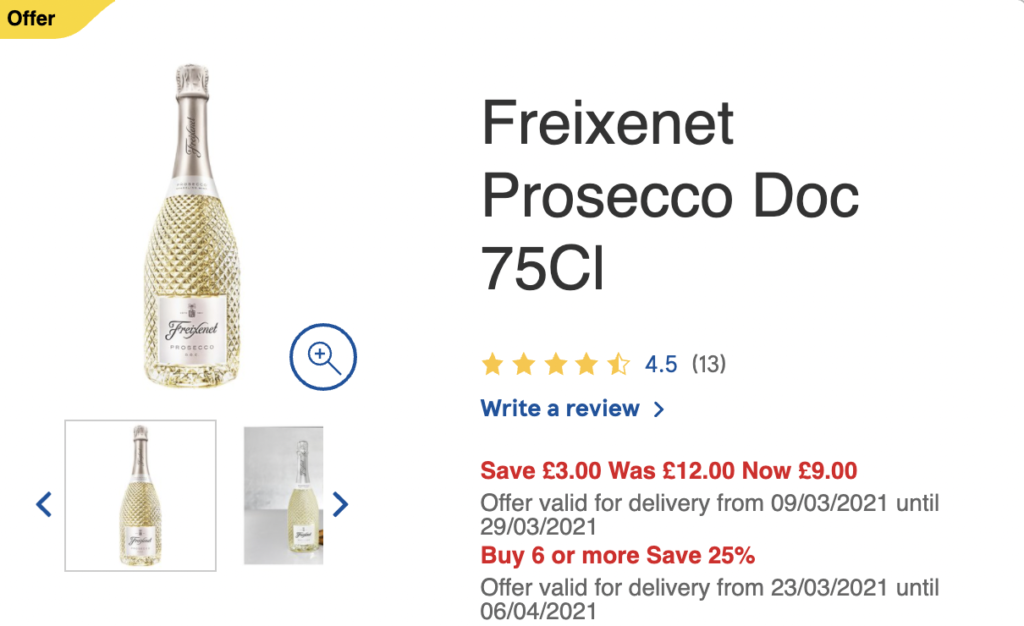
Freixenet Prosecco Doc 75Cl


  • On sale at £9 (norm £12)
  • 25% off 6 bottles

Total for 6 bottles after promo: £40.50 (£6.75 each)

Total cost normally: £72


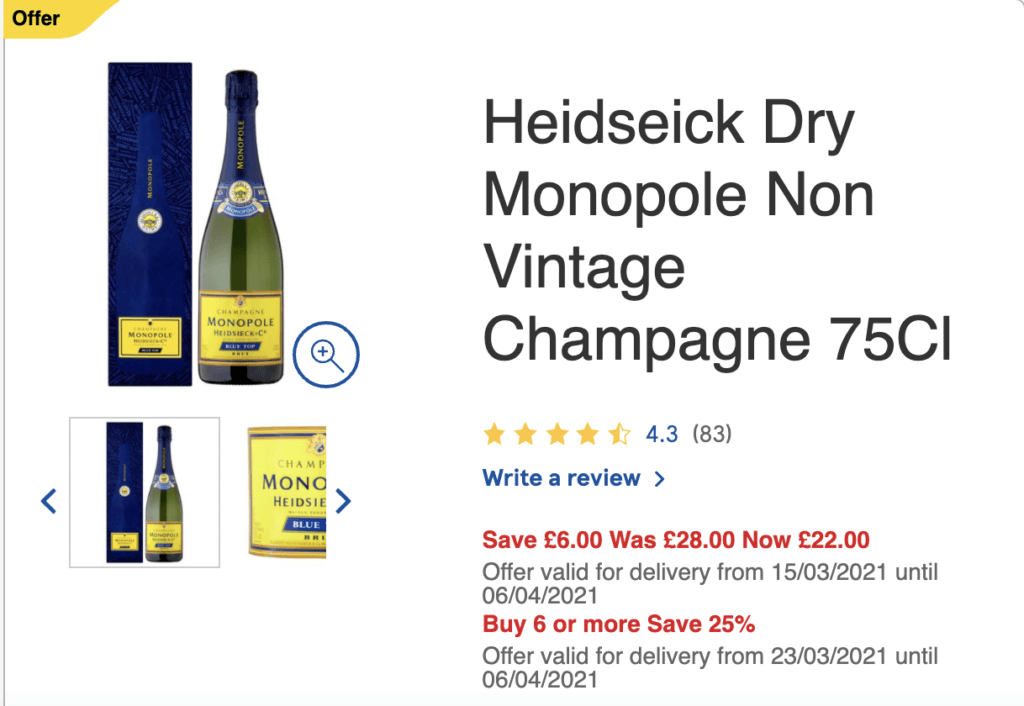
Heidseick Dry Monopole Non Vintage Champagne 75Cl


  • On sale at £22 (norm £28)
  • 25% off 6 bottles

Total for 6 bottles after promo: £99 (£16.50 each)

Total cost normally: £168


Conclusion – 25% Off Wine

If wine, prosecco or champagne were on the shopping list this week, then hopefully this saves you a bit of money on your tipple of choice.

Hopefully at sometime in the near future – we can all share a cheap glass of fizz together.

And of course… remember to drink responsibly. 

Will you be heading to Tesco to stock up? I’d love to know in the comments below, on Twitter @Jordon_Cox or on Facebook.

The post 25% Off 6 Bottles Of Wine, Champagne & Prosecco appeared first on Jordon Cox.

]]>
https://jordoncox.com/25-off-wine/feed/ 5
ITV Tonight – How I Saved Money & You Can Too https://jordoncox.com/itv-tonight-coupon-kid/ https://jordoncox.com/itv-tonight-coupon-kid/#respond Thu, 18 Mar 2021 18:35:39 +0000 https://jordoncox.com/?p=4061 From apps on your phone to websites to bookmark – there are…

The post ITV Tonight – How I Saved Money & You Can Too appeared first on Jordon Cox.

]]>

From apps on your phone to websites to bookmark – there are a lot of ways to save money. Here are the highlights from my appearance on ITV Tonight.

Hi there! If you found me by seeing my segment on ITV Tonight – then welcome! I’m thrilled to see you here on my website. If you’re already a reader – then welcome back!

It was a lot of fun to contribute to the ITV Tonight show and demonstrate how easy saving money can be.

As there was a lot of information compact into a very short space of time – I thought I’d write this blog so that you can take it in at a slower pace.

Here’s everything you need to know:

A Little About Me

Hi – I’m Jordon. I’m known as Britain’s Coupon Kid and have been saving money since age 15.

I worked for 4 years at Money Saving Expert as a deals and coupons blogger… now I blog full time as a freelancer!

When I’m not couponing or blogging, I do some public speaking and I also host a podcast called Secrets To Saving Money – so do check that out!

ITV Tonight – Coupon Kid Top Tips

First off, let me just say that I don’t use these apps every single day. These are ways that I save money over the month, into a jam packed day of saving money.

You don’t need to use all of these, but you can pick and choose which suits your lifestyle.

They all only take a few minutes to figure out or check before you go shopping – and the money you save will add up to a lot of cash.

Lidl Plus App

Lidl Plus app coupons Jordon Cox Britain's Coupon kid

If you download the new Lidl Plus app, you can get a number of discounts off your shopping.

Here’s a rundown of the deals/coupons you can get each month:

  • Spend £100 total in a calendar month – £2 coupon (no minimum spend)
  • Spend £200 total in a calendar month – £10 coupon (no minimum spend)
  • Rotating coupons every Thursday
  • ‘Wheel of Surprise’ to spin after every trip – chance to win coupons & money off
For all the details about how it works and how to get it, see my blog.

Supermarket Cashback Apps

Shopmium promo

You can save a lot of money on your supermarket shopping by using apps on your phone.

Quite often you’ll find things for free, and all it takes to claim the cashback, is a scan of the barcode and a picture of the receipt.

There are several different apps like this to save you money – each with different offers. Here they are:

Shopmium

CheckoutSmart

GreenJinn

My favourite of the three is Shopmium – where you get all the cashback claims paid out to PayPal after 1-2 days, so it’s nice and quick.

You can find out all about how Shopmium works (and get a free tube of Pringles as a bonus) in my blog here.

Cheapest Petrol Prices

Cheapest fuel near me cheap petrol prices header image Jordon Cox Britain's Coupon Kid

There’s an app on your phone which will show you what pump is the cheapest to go to in your area.

Of course, there is no point travelling miles for the cheapest one, but if you’re out and about and wanted to avoid the high motorway prices, this is a good app.

It’s all updated by users whenever they are at a pump, so is usually kept fresh. Prices are shown for petrol and diesel.

The app is called Petrol Prices, and you can find out more about it in my blog here.

Price Comparison Websites

CamelCamelCamel UK

Before you buy anything online, you should always do some price comparisons.

Not only can this tell you where the cheapest place to buy anything online is, but it could also give an insight into whether now is the cheapest time to buy.

Here are some websites to look at:

Idealo.co.uk – Check where is cheapest, look at previous pricing & set price alerts

CamelCamelCamel – Only for Amazon products, check previous pricing & set price alerts

Google Shopping – Just Google an items before you buy, and click on the shopping tab to see where’s cheapest

Airtime Rewards – Automatic Cashback

Airtime Rewards app

Highly recommend everyone downloading this app. It’s something that you can spend 5 minutes setting up and forget about it, as it saves money for you.

Once you download the app and link all of your Visa and Mastercards to it, you’ll receive cashback into your account if you shop at one of their retailers.

Retailers include Boots, Primark, Morrisons, Greggs, Wilko and many more – so savings should add up over time.

The money saved will go towards your mobile phone bill to pay it off at the end of the month,

For full details (and how to get £1.50 free credit), see the blog explaining everything here.

Cashback Websites – Saving Money On Anything Online

TopCashback Guide (Plus Make £75 in Profit)

If you don’t have TopCashback or Quidco on your mind when you’re buying anything online, I certainly reccomend you now do.

In the few years that I have used cashback websites, I’ve saved well over £1,500 now, and it’s all on stuff that I was going to buy anyway.

I’ve got cashback on holidays, car insurance, travel insurance, clothes, groceries, and even made a bit of profit on some offers (meaning I got more cashback than I paid for the items).

If you want to find out more about how cashback websites work, have a look at my TopCashback Guide for full details.

Too Good To Go App

Too Good To Go App - Stop Food Waste Cheap Restaurant Mystery Boxes

You can get a lot of reduced food from supermarkets and restaurants by downloading the Too Good To Go App.

Make sure you log on each morning to see if there are any mystery boxes of food, or even restaurant meals that you can pick up cheap at the end of the day.

The supermarket boxes contain a lot of food, so make sure you freeze or split things out with other people so it doesn’t go to waste.

It’s a great way to cut down your costs on food, and also stop food from being thrown in the bin. 

You can find out more about Too Good To Go and how it works in my blog here.

How To Make Money On Fiverr

I’ve made quite a bit of money through selling services on Fiverr.

It’s quite easy to do, and you can do this alongside your main source of income. It’s called a ‘side hustle’.

I’ve been selling voiceovers mostly on Fiverr. If you want to read about my experience on there – have a look at my blog here.

Few Extra Deals

In case you were interested, I’ve written a lot of articles while blogging here to save you money!

Here are a few ways that you can save money, other than the ways above!

– £99 of Harry Potter Audiobooks For 99p

– 2 For 1 KFC Meals With Walkers Max Crisps

– Refer A Friend Schemes – Make £100s From Your Friends & Family

– Amazon Tricks – Save Money On Amazon

– How To Make Money On Fiverr UK – I Made £300 In 2 weeks

Follow Me For More Deals & Tips

Hopefully there’s something in here to save you money! Thanks for stopping by this blog – I really appreciate it.

If you like saving money, and want to find out about more deals when they are released, you can subscribe to email updates, follow me on Twitter or on Facebook.

I’ve also launched a podcast this year – so if you want to listen to the best ways to save money, you can check out the Secrets To Saving Money podcast here.

The post ITV Tonight – How I Saved Money & You Can Too appeared first on Jordon Cox.

]]>
https://jordoncox.com/itv-tonight-coupon-kid/feed/ 0
Lidl Plus App UK – Get Coupons & Money Off Your Shopping https://jordoncox.com/lidl-plus-app/ https://jordoncox.com/lidl-plus-app/#comments Wed, 13 Jan 2021 21:11:03 +0000 https://jordoncox.com/?p=2436 Coupon apps on your phone have becoming more popular recently. Now this…

The post Lidl Plus App UK – Get Coupons & Money Off Your Shopping appeared first on Jordon Cox.

]]>

Coupon apps on your phone have becoming more popular recently. Now this new one from Lidl, called Lidl Plus, can save you money, earn coupons and also improve your experience when shopping.

Lidl is already one of the cheapest supermarkets in the UK. Not very often do you see any type of discounts or coupons available – but that has all changed now.

Lidl has just released its brand-new app called Lidl Plus, and it’s full of features to get the most out of your supermarket shopping at Lidl.

Here’s a rundown of what the app is, how to get Lidl coupons and how it can save you money.

Lidl Plus UK Card App image

What Is Lidl Plus?

Lidl Plus is a mobile phone app (available on iOS and Android), which you can use to save you money, see your past purchases and browse in store deals and leaflets.

Upon signing up, you are given a personalised QR code for your profile, which when scanned at the till, gives you money off with digital coupons.

If you get up to target amounts of money spent in store, you can unlock more rewards and more coupons each month.

It also gives you a scratchcard each time you scan your card, for your chance to win more coupons and discounts on your next shop.

It was released on Thursday 3rd September 2020 – but there are new features being added all the time.

What Other Coupons Are Available On Lidl Plus UK?

Do you remember the days when we’d be hoping and praying for Lidl coupons in the Metro newspapers? They were quite uncommon, but there was always a buzz when they’d come out.

With the Lidl Plus app, now all the coupons are digital, so you don’t have to move a muscle (other than your finger) to add it to your digital wallet.

At the time of writing, there are 5 coupons available to you when you download the app, and set up your account. 

Note: The coupons change every Thursday, so there may be new ones by the time you check. 

Here’s what they are:

  • 15% off all J.D. Gross Chocolates
Lidl Plus App Coupons JD Gross Chocolate
  • 20% off All Chef Select Chilled Ready Meals
Lidl Plus App Coupon Chef Select Ready Meal
  • 20% off All Highgate Fayre, Mister Choc, Maribel & Choco Nussa Jams and Spreads
Lidl Plus Coupons Spreads
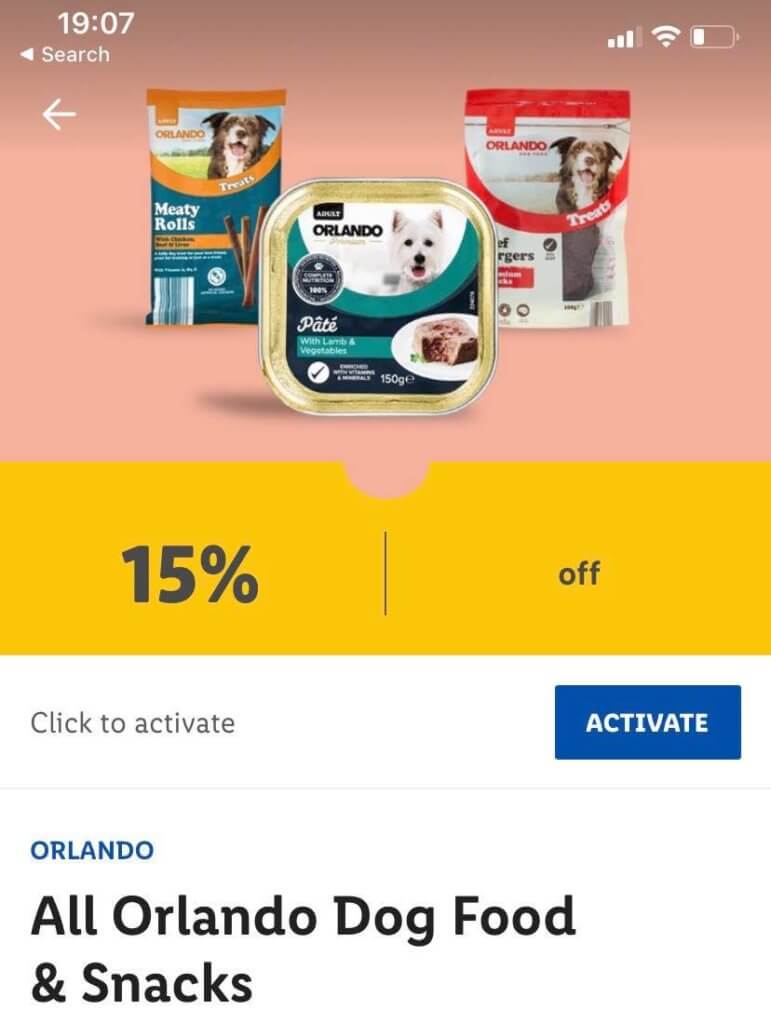
  • 15% off All Orlando Dog Food & Snacks
Lidl Plus Coupon Dog Food

These product specific deals look to change around on a weekly basis – so make sure you keep checking back each week to see if there is something on there that you would use.

It is unclear how the deals will work in the future – as it may become the case that coupons and deals are targeted to what you usually spend money on.

Related: How to save money with coupons in the UK

How To Claim Lidl Plus Digital Coupons

It’s quite a simple process to redeeming one of the coupons that’s on offer. And because they are digital, there’s no faffing about with bits of paper either.

Once you’ve signed up and logged into your account, head over to tab in the app that says “coupons”. This is where you’ll find all of the offers mentioned above.

To add it to your digital wallet, tap the ‘activate’ button – and it’ll be added to your personal QR code.

Lidl Plus App Coupons

Once you’ve been round the supermarket and bought your shopping, scan your Lidl Plus card QR code at the till, and if you’ve bought any items that you have a coupon for in your wallet, you’ll receive the discount.

You can see that they have been added to your Plus card, as it will say how many coupons have been added when you pull up the card.

You may end up getting more coupons appear for you through its scratchcard feature though – which makes your shopping a bit more exciting.

Related: How to compare prices in the supermarket

Coupon Plus – Earn up to £12 a month

A new feature to the app (added during its launch) is called Lidl Plus – Coupon Plus.

This rewards you with more coupons into your Lidl Plus app for spending certain targets in store within each month.

The targets are quite high, but if you have a big family, or shop for a family member at Lidl, you might reach them.

  • Spend £100 in store and get a £2 coupon
  • Spend £200 in store and get a £10 coupon

The coupons earned can be spent at any time, and has no minimum spend, so it is basically free food.

You have to hit these targets within a calendar month, so if you do a big shop on the 30th September, if won’t roll over to October.

You can see in the app how close you are to hitting your target, as it updates how much you’ve spent every time you scan your QR code.

I’d say it’s not worth going out of your way to claim these (as you could be spending more than you would’ve done), but something to keep in mind.


Lidl Plus Coupon Plus app UK

Get Free Scratchcards When You Shop

Another feature of the app (which looks like a fun way to lure customers in), is the scratchcard feature.

Details aren’t very clear at the moment, but it looks as though each time you shop at Lidl and scan your card, you’ll be given a free scratchcard in the app which you scratch off with your finger.

Some will be losers, but others win you coupons and more money off your next shop. It is unclear what coupons you might win when scratching – but either way it should save you a bit of cash.

From looking through a post of HotUKDeals, a few people have won coupons for £20 off a £20 spend – so it could end up getting you some free shopping.

The T&Cs of the scratchcards while using the app is a bit unclear. If you get a scratchcard every time you shop, then it might be worth splitting up your transactions, in order to have more

Store Past Receipts

Another handy feature of the app, is that every time you shop at Lidl and scan your Lidl Plus card, your receipts are uploaded onto your app.

This way, you can check back each week to see what you’re spending. It’s handy if you’re trying to stick to a budget, or the shop is being put towards your expenses for tax purposes.

Partner Offers

Within the app, there is also a tab labeled ‘partner offers’, in which brands associated with Lidl have offers running for users of the app to claim.

These probably won’t be for everyone, and they look like standard offers you can get elsewhere – but it’s worth paying attention too in case anything pops up.

At the moment, the offers currently available are:

  • 25% off Sky TV
  • 2 Month free subscription to Readly
  • 25% off Rakuten TV and CHILI
  • 40% off cinema tickets with the Cinema Society

And that’s all the Lidl app has to offer at the moment. I’m excited to see what Lidl Plus UK has in store in the future, and any new coupons and deals they may be releasing.

If you wanted to check it out – here are the links to iOS and Android downloads.

Of course, please remember, it’s still in a testing stage at the moment, so it may have a few teething problems before its actual release date.

If you start using the app, I’d love to know your experience with it! Hopefully it saves you money as always.

Will you be using the new Lidl Plus app and saving money with the coupons? I’d love to know in the comments below, on Twitter @Jordon_Cox or on Facebook.


Jordon's Top Pick

This article is one of my Top Picks to save you money. To see the full list, be sure to check out the blog.

Top Picks

The post Lidl Plus App UK – Get Coupons & Money Off Your Shopping appeared first on Jordon Cox.

]]>
https://jordoncox.com/lidl-plus-app/feed/ 1
55p For Two Cereal Boxes Deal Stack – (Norm £5+) https://jordoncox.com/55p-cereal-deal-stack/ https://jordoncox.com/55p-cereal-deal-stack/#respond Wed, 11 Nov 2020 14:27:42 +0000 https://jordoncox.com/?p=3223 It’s been a while since there has been a great coupon deal…

The post 55p For Two Cereal Boxes Deal Stack – (Norm £5+) appeared first on Jordon Cox.

]]>

It’s been a while since there has been a great coupon deal stack – but the time is now. Here’s how to get £5+ of cereal for just 55p.

Nothing starts the day off better than a big bowl of Shreddies or Cheerios (in my book at least). If you’re the same, it’s a good month for all concerned.

There are currently two different coupon/cashback offers on Nestle cereals which can be stacked together and get yourself a bargain.

Here’s where you need to go, and how to get it:

What Cereals Can You Get?

For this deal, you have to get specific boxes of cereal to get the cheapest price, though you can work around it if you perhaps don’t eat them.

I’ll be writing about in the blog how to get the cheapest ones, which are these two boxes:

  • Shreddies Original 415g
  • Cheerios Multigrain 600g

Usually these cost £5+ for the two boxes (as they are larger boxes). But you can get that price down to just 55p for the two. Here’s how: 

Tesco – Clubcard Prices

If you’re a Tesco Clubcard holder, they have been doing promotions on products called ‘Clubcard Price’, which gets you money off your shopping when you scan it. You’ll need to do this in store in order for the rest of the deal to work.

Usually, a pack of Nestle Cheerios 600g costs £3.30, but has a clubcard price of £2.

Also, the Nestle Shreddies usually costs £2.10, but the Clubcard price this month is £1.05.

This drops the price of the 2 cereal boxes down from £5.40 to just £3.05. But this is just the tip of the iceberg.

Cashback Deal: £1.50 off 2 boxes of Nestle Cereal

On the Nestle website, they have just launched a cashback/coupon deal which gets you £1.50 off when you buy two Nestle cereals.

They’ve given you the chance to print off a PDF coupon, or claim cashback on them via a form after you’ve bought it.

If it were me, I’d probably go with the cashback claim – which you can find on the Nestle website.

You’ll need to keep hold of the receipt to prove you bought two cereal boxes, and send off a picture to get your cashback.

The cashback can be claimed on any Nestle cereal of any size, so you might as well choose one that is on offer (or has other offers that you can use on top).

So buying the two cereals above gets you £1.50 cashback, dropping the price to £1.55 for the two. Already a good deal – but you can go one further.

Related: Coupons UK – How to find them

Cashback: £1 off Nestle Cereal Boxes

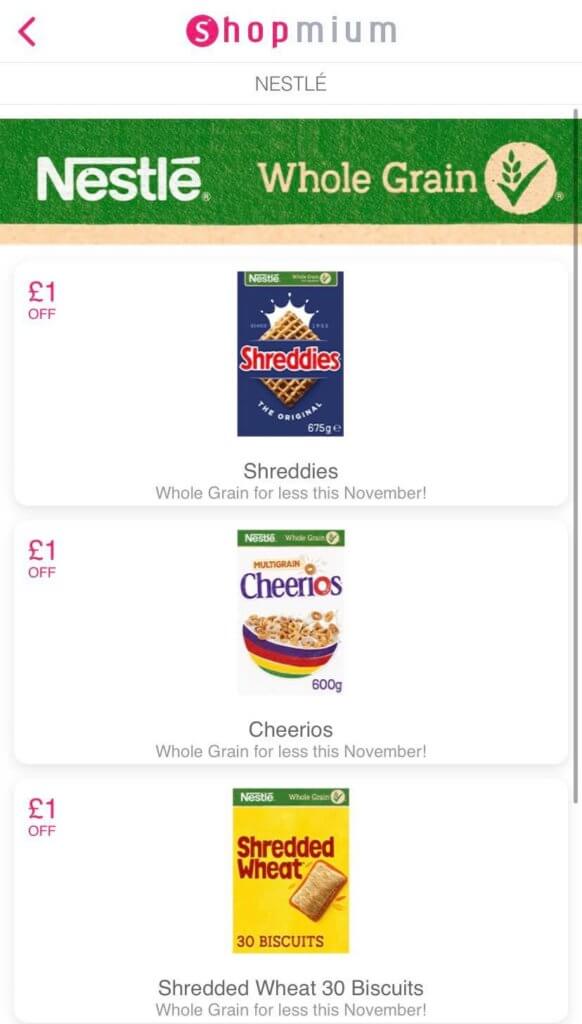
To add to it, there is currently a cashback offer on the Shopmium app for Nestle cereal! Wahay!

You can claim £1 cashback on four different cereals. They are:

  • Shreddies Original 675g
  • Cheerios Original 600g
  • Shredded Wheat 30 Biscuits
  • Shredded Wheat 24 Biscuits

You can claim the cashback once for each box (so you can get up to £4 off in total).

For the purpose of this deal, we’ll only be claiming the £1 off Cheerios, as the Shreddies pack we’ll get isn’t the big 675g (as it’s not on sale).

This means that you’ll get £1 extra cashback on top of the £1.50 cashback from earlier. You’ll need to take a picture of the receipt like with the Nestle offer to get the cashback.

If you want to know more about Shopmium, see my blog here.

Total: £2.50 Cashback

So to quickly recap. You can get £1.50 in cashback from the Nestle website (when you buy 2 boxes), and you can get £1 in cashback on Shopmium.

That’s a total of £2.50 in cashback for buying the 2 boxes of cereal.

As the 2 boxes only cost £3.05 at Tesco (after the offer), the cashback that you claim will drop the price down to just 55p.

That works out at 27.5p per box. That’s over a 90% saving on the cereal. A great way to start your day, knowing it only cost you a few pence!

Both cashback offers and Tesco Clubcard offers last until the end of November.

Conclusion

It’s a fairly easy deal stack, and could keep your family stocked up for breakfast for a long while.

Make sure to keep hold of your receipt when you buy them too – as that’s the golden ticket to your cheap cereal.

If you manage to get your hands on some – be sure to let me know!

For a deeper analysis, see MSE’s blog post here.

Will you be getting some cheap cereal? I’d love to know in the comments below, on Twitter @Jordon_Cox or on Facebook.

The post 55p For Two Cereal Boxes Deal Stack – (Norm £5+) appeared first on Jordon Cox.

]]>
https://jordoncox.com/55p-cereal-deal-stack/feed/ 0
Co-op Frozen Meal Deal for £5 https://jordoncox.com/co-op-frozen-meal-deal-for-5/ https://jordoncox.com/co-op-frozen-meal-deal-for-5/#comments Wed, 23 Sep 2020 18:11:45 +0000 https://jordoncox.com/?p=1850 The Co-op frozen meal deal is something that I wait for each…

The post Co-op Frozen Meal Deal for £5 appeared first on Jordon Cox.

]]>

The Co-op frozen meal deal is something that I wait for each month! If your freezer is running low, it’s worth seeing what the deal is each month – and the current one gives me goosebumps.

Supermarkets always showcase multi-buy offers, and deals in store – but sometimes it can get overwhelming. How do you know what deals are ACTUALLY good?

Well, one deal that is a sure bet is the Co-op frozen meal deal for £5. It’s an ongoing offer too, with a new meal deal appearing monthly.

September is no different, with a deal appearing this month that gets you 6 frozen food items for £5 (or 83p each).

Co-op frozen meal deal – what is it?

Every 3-4 weeks, the Co-op brings out a frozen meal deal that consists of usually 5 or 6 items – costing £5 for everything.

It always includes at least one main course meal, with a few sides and some kind of ice cream. It has been known to do expensive Oreo and Ben & Jerry’s ice cream in the past.

There is no coupon required with this deal, simply pick up the items and take them to the till. 

In total, this deal normally saves you around £5-10, and quite often, you’ll find one item that usually retails at around £3-4 on its own if purchased separately.

It sounds good, but it’s worth weighing up the deal each month. If there are items in the deal that you just wont eat, it might not be a good deal for you. Don’t buy it just because there’s a lot of money off.

Related: How to find coupons in the UK

Where can you find the Co-op Frozen Meal Deal?

The deal is available in participating stores (around 1,600 of the 2,000+ nationwide), so it’s worth checking if your store has one.

You’ll find the deal in the freezer section, usually with signs around them for the £5 frozen meal deal. All the items should all be together, which makes things easier.

To get the deal, you have to get one of each item included. You can’t substitute if you don’t want one of the products unfortunately.

Related: Get cashback on supermarket shopping with Shopmium

Co-op Frozen Meal Deal for £5 found in store
I found the Co-op Frozen Meal deal in my local store. Here’s what it looks like

September 2020 – £11.25 of food for £5

The deal this month includes 5 Birds Eye items and Rowntrees Fruit Pastilles ice lollies.

These items individually add up to £11.25, so you’re saving £6.25 by getting it as part of this deal. Here’s everything you get:

  • Birds Eye 2 Southern Fried Chicken Grills (180g)
  • Birds Eye Chicken Burgers (200g)
  • Birds Eye 8 Crispy Fish Fingers (224g)
  • Birds Eye Mini Potato Waffles (456g)
  • Birds Eye Mixed Vegetables (340g)
  • Rowntrees Fruit Pastilles Ice Lollies (4 x 65ml)

As this month there are 6 items included, you’re getting each thing for around 83p. The ice lollies alone cost £2.40 usually, and everything else is more than half price.

This deal is running until Tuesday 6th October, and it’s while stocks last. It has been known to sell out, so it’s better to go sooner rather than later.

Related: Compare prices in supermarkets

Students save an extra 10% 

If you’re a student (or in adult higher education), you can get an extra money off at the Co-op. If you don’t have a TOTUM student card (originally NUS), then you could be missing out on a lot of student discounts.

One of these discounts is the Co-op, where you can get 10% off every time you shop in there. You can also get discounts on the likes of Topshop, ASOS and even Apple.

Other frozen meal deals

If you don’t have a Co-op near you, or your local store doesn’t have the offer, there are other options for you to choose from.

Iceland have been known to do frozen meal deals, with it changing regularly. Right now you can get a Chinese meal for £5.59.


Hopefully this Co-op frozen meal deal comes in handy for you. If Co-op isn’t your supermarket of choice, you can compare supermarkets to see which is the cheapest each week.

Will you be getting a Co-op meal deal? I’d love to know in the comments below, on Twitter @Jordon_Cox or on Facebook.


Jordon's Top Pick

This article is one of my Top Picks to save you money. To see the full list, be sure to check out the blog.

Top Picks

The post Co-op Frozen Meal Deal for £5 appeared first on Jordon Cox.

]]>
https://jordoncox.com/co-op-frozen-meal-deal-for-5/feed/ 4